Showing posts with label Object Oriented. Show all posts

Friday, May 31, 2013

Java Swing BlackJack: The Final Touches

Graphical BlackJack: Adding Game Logic

Graphical BlackJack: Adding Game Logic

Introduction

In the original text based version of this game there was a considerable amount of game logic. The game would proceed in the following fashion:

  1. Game Start Up
  2. Player Enters Bet
  3. Initial Hands for Player and Dealer are displayed
  4. Player decides to Hit or Stand (This is looping code the player can Hit until the hand Busts or the Player presses Stand or the Hand = 21)
  5. The Dealer hand his played using the rule dealer must hit 16 or under
  6. The Hands are scored the closest to 21 without going over wins. Ties mean the bet money is returned and player starts a new hand
  7. Go back to step 2.
  8. Player quits by pressing the Windows red "X" button

Most of the above logic can be cut and pasted into the actionPerformed method with little revision. There will some Button handling things to add.

  • When the game starts the Hit and Stand buttons are disabled and the Bet button is enabled
  • After the Bet is placed the Bet button is disabled and the Hit and Stand buttons are enabled
  • When the stand button is pressed or the hand is bust or at 21 and before the dealer logic is started the Hit and Stand buttons are disabled.
  • After the winner is determined and it's time for a new round the Bet button needs to be enabled again.

JTextField problems

There is the issue (it's been ignored for a while) that the JTextField where the user enters the Bet amount needs to be enlarged. Currently it is appearing so small that when the user clicks in it to type something nothing appears. A simple call to the JTextField's setPreferredSize method placed in the BlackJack run method before the JTextField gets added for diplay will fix this:

  • betField.setPreferredSize(new Dimension(75,25));

Ouput
Start Up

  • Bet button active
    • nothing to be done the default state for a created JButton is Enabled = true
  • hit and stand inactive
    • add hitButton.setEnabled(false) and same for standButton
    • This is placed in run method after the buttons are created
  • Enter JTextField value and press bet
    • deactivate bet button
    • activate hit and stand
    • if no value entered in JTextField or non-numeric entered clear JTextField and leave bet button active and essentially do nothing until the user enters something meaningful (a try-catch block is used to capture this)
    • These changes are added to the actionPerformed method (check if "bet" action command has come in)

Code Changes to BlackJack

public void actionPerformed(ActionEvent ae) {
    if ("hit".equals(ae.getActionCommand())) {
        // Hit button press add a card to the player hand then redisplay frame
        this.player.deal(this.card);

        // Once the card is added you need to revalidate the frame and repaint
        frame.validate();
        frame.repaint();
    }
    if ("bet".equals(ae.getActionCommand())) {
        String betStr = betField.getText();
        try {
            this.bet = Integer.parseInt(betStr);
        } 
        catch (Exception ex) {
            // set bet = 0 and reset the JTextField to empty the box of bad text
            // return (do nothing user entered invalid text)
            // At some point need to add a Message display to window to 
            // Inform the user of problems
            betField.setText("");
            bet = 0;
            return;
        }
        // Bet is an int so go ahead and deactivate Bet Button enable hit and stand
        betButton.setEnabled(false);
        hitButton.setEnabled(true);
        standButton.setEnabled(true);
        frame.validate();
        frame.repaint();
    }
}

/**
 * run method that does all the work of this class
 */
@Override
public void run() {
    Container contentPane = frame.getContentPane();


    // Set the layout manager for the JFrame using the contentPaine
    FlowLayout layout = new FlowLayout();
    contentPane.setLayout(layout);

    frame.setDefaultCloseOperation(JFrame.EXIT_ON_CLOSE);
    frame.setPreferredSize(new Dimension(300,500));

    // Need a label for the JTextField
    JLabel betLabel = new JLabel("Bet Amount:");

    // set the different Action Command Strings
    betButton.setActionCommand("bet");
    hitButton.setActionCommand("hit");
    standButton.setActionCommand("stand");

    // set this BlackJack class as the handler for each of the buttons
    betButton.addActionListener(this);
    hitButton.addActionListener(this);
    standButton.addActionListener(this);

    // Disable Hit and Stand buttons
    hitButton.setEnabled(false);
    standButton.setEnabled(false);

    // Set size of the bet JTextField 
    betField.setPreferredSize(new Dimension(75,25));

Output

Here is the start up screen notice the hit and stand buttons are greyed out. The user has also entered "abc" for the bet amount BlackJackStartInactiveButton.png

After pressing the Bet button on the bad bet text the JTextField is reset and the bet Button remains active with the other buttons inactive. BlackJackAfterBadBet.png

Entering a number in the bet field and pressing the Bet button, the Bet button becomes inactivated, and the hit and stand buttons are now active .img/BlackJackAfterGoodBet.png

There are still a couple of issues lingering with this user input. The bet field is an int type. It can take on negative numbers which would mean that the user would get paid if they lose the hand. This can be handled by taking the absolute value of the entry or resetting and forcing the user to reenter.

The player can also enter 0 as a valid bet. So the second way above for handling a bad bet is probably the easiest. Just test for input less than or equal to 0 and reset if it is.

One more problem that is not dealt with is the fact that a bet is not checked against the bankroll. Losing all your money means your done playing in Vegas it may be a good thing to do here. But this problem will be deferred until later.

The following code added after the exception handling block (ie. try-catch) should fix the problems

// Check if bet is less than or equal to 0 and reset if it is
if (bet <= 0) {
    betField.setText("");
    bet = 0;
    return;
}

Add in Game Logic

While weaving in the game logic it became apparent that there is a need to have a message display and a continue button. Otherwise when the hands are scored the program will cause the hands to disappear (or at least that is the functionality you want) and the Player won't know what the status of the hand is and feel the program is cheating.

There also needs to be a screen area set aside to display the bankroll. That is how the Player determines how well they are doing. The JLabel will suffice for displaying text. Two more will be added one for an informational display and one for the Bankroll. We may want to place the bankroll JLabel inside a JPanel so it can have a titled border.

What was changed?

  • Added fields into BlackJack class for the continue button and the extra labels
  • Set the dimensions of the player hand and the dealer hand. This helps in maintaining the window at a constant size when there are no cards in the hand yet
  • Added a handleDealer method to do the game logic for the dealer's hand and scoring for determining win or lose
  • Added a resetFrame method to start a new round with no cards in the hands
    • remove all the swing objects from frame with a call to the ContentPane.removeAll method
    • then add back all the elements just like what happens at start up
  • worked the logic into actionPerformed
    • when to activate continue button and deactivate the others
    • The buttons keep the state of the game by being activated or deactivated
  • Moved some of the elements around to prepare for using a better Layout Manager than FlowLayout in the future
  • Got rid of all the text output method calls. Everything happens on the screen

Code for BlackJack

/*
 * BlackJack a simple implementation upgrade for graphical card display
 */
package blackjack;

import java.awt.Container;
import java.awt.Dimension;
import java.awt.FlowLayout;
import java.awt.event.ActionEvent;
import java.awt.event.ActionListener;
import java.io.IOException;
import java.net.MalformedURLException;

import javax.swing.JButton;
import javax.swing.JFrame;
import javax.swing.JLabel;
import javax.swing.JTextField;
import javax.swing.SwingUtilities;

/**
 * This class controls the game logic of this simple implementation of 
 * Black Jack. A more profession version would allow for multiplayer games
 * via a game server so you could play your friends on the internet. 
 * Some improvements would be:
 * <p>
 *    Adding insurance (players could insure bets against a dealer having blackjack) <p>
 *    Increase the payout for a blackjack hand to 1.5 x the original bet <p>
 *    Double Down <p>
 *    Splitting pairs <p>
 * 
 * @author Nasty Old Dog
 */
public class BlackJack implements ActionListener, Runnable {

    int bankroll = 1000;
    int bet = 0;
    CardDeck card;
    Hand player;
    Hand dealer;
    BlackJackStrategy strategy = new BlackJackStrategy();
    JFrame frame = new JFrame("BlackJack");
    JButton hitButton = new JButton("Hit");
    JButton standButton = new JButton("Stand");
    JButton betButton = new JButton("Bet");
    JButton continueButton = new JButton("Continue");
    JLabel bankLabel = new JLabel("Bankroll: " + bankroll);
    JLabel infoLabel = new JLabel("Welcome to BlackJack");
    JTextField betField = new JTextField();
    // Need a label for the JTextField
    JLabel betLabel = new JLabel("Bet Amount:");

    public BlackJack() {
        this.card = new CardDeck(this.strategy);
    }

    /** 
     * handles the Dealer hand playing logic
     */
    public void handleDealer(int pscr) {
        int dscr = 0;
        String msg = "Player score: " + pscr + "   Dealer: " + dscr;
        if (pscr > 21) {
            msg = msg + ": BUST LOSER!!!";
            bankroll -= bet;
        } else {
            for (dscr = dealer.scoreHand();
                    dscr < 17;
                    dscr = dealer.scoreHand()) {
                this.dealer.deal(card);
            }

            // Code to score the game and settle the bet will go here
            if (pscr > dscr) {
                msg = msg + ": You Win!!!";
                bankroll = bankroll + bet;
            } else if (dscr > 21) {
                msg = msg + ": You Win!! Dealer has BUSTED";
                bankroll += bet;
            } else if (pscr == dscr) {
                msg = msg + ": PUSH";
            } else {
                msg = msg + ": LOSER!!!";
                bankroll -= bet;
            }
        }

        // Print message about who won. Then wait for continue button to be 
        // pressed so user can have time to look at cards and verify the 
        // situattion
        infoLabel.setText(msg);
        betButton.setEnabled(false);
        hitButton.setEnabled(false);
        standButton.setEnabled(false);
        continueButton.setEnabled(true);
        frame.validate();
        frame.repaint();
    }

    /**
     * Handles all the graphics user input
     * @param ae ActionEvent generated by JButtons in the frame
     */
    @Override
    public void actionPerformed(ActionEvent ae) {
        if ("hit".equals(ae.getActionCommand())) {
            // Hit button press add a card to the player hand then redisplay frame
            this.player.deal(this.card);

            // Once the card is added you need to revalidate the frame and repaint
            frame.validate();
            frame.repaint();
            int scr = this.player.scoreHand();
            if (scr > 21) {
                // Player has gone bust display a message and activate continue button
                bankroll -= bet;
                this.handleDealer(scr);
            }
            if (scr == 21) {
                // Player has 21 and will win if dealer has <21 or bust
                this.handleDealer(scr);

            }
            // Otherwise do nothing player decides whether to hit or stand
        }
        if ("stand".equals(ae.getActionCommand())) {
            // Player is done getting cards time to do the dealer stuff
            this.handleDealer(this.player.scoreHand());
            betButton.setEnabled(false);
            standButton.setEnabled(false);
            betButton.setEnabled(false);
            continueButton.setEnabled(true);

        }
        if ("bet".equals(ae.getActionCommand())) {
            String betStr = betField.getText();
            try {
                this.bet = Integer.parseInt(betStr);
            } catch (Exception ex) {
                // set bet = 0 and reset the JTextField to empty the box of bad text
                // return (do nothing user entered invalid text)
                // At some point need to add a Message display to window to 
                // Inform the user of problems
                betField.setText("");
                bet = 0;
                return;
            }

            // Check if bet is less than or equal to 0 and reset if it is
            if (bet <= 0) {
                betField.setText("");
                bet = 0;
                return;
            }

            // Bet is an int so go ahead and deactivate Bet Button enable hit and stand
            betButton.setEnabled(false);
            hitButton.setEnabled(true);
            standButton.setEnabled(true);
            player.deal(this.card);
            dealer.deal(this.card);
            player.deal(this.card);
            dealer.deal(this.card);
            frame.validate();
            frame.repaint();
        }
        if ("continue".equals(ae.getActionCommand())) {
            betButton.setEnabled(true);
            hitButton.setEnabled(false);
            standButton.setEnabled(false);
            continueButton.setEnabled(false);
            bankLabel.setText("Bankroll: " + bankroll);
            infoLabel.setText("Welcome to BlackJack, Place your bet!");
            betField.setText("");
            bet = 0;
            player = new Hand("Player");
            dealer = new Hand("Dealer");
            this.resetFrame();
        }
    }

    /**
     * This reset the entire frame and reloads all the displayable objects in 
     * the proper order
     */
    public void resetFrame() {
        frame.getContentPane().removeAll();
        player.setPreferredSize(new Dimension(500,150));
        dealer.setPreferredSize(new Dimension(500,150));

        frame.add(infoLabel);
        frame.add(dealer);
        frame.add(player);
        frame.add(hitButton);
        frame.add(standButton);
        frame.add(continueButton);
        frame.add(betLabel);
        frame.add(betField);
        frame.add(betButton);
        frame.add(bankLabel);
        frame.validate();
        frame.repaint();
    }

    /**
     * run method that does all the work of this class
     */
    @Override
    public void run() {
        Container contentPane = frame.getContentPane();


        // Set the layout manager for the JFrame using the contentPaine
        FlowLayout layout = new FlowLayout();
        contentPane.setLayout(layout);

        frame.setDefaultCloseOperation(JFrame.EXIT_ON_CLOSE);
        frame.setPreferredSize(new Dimension(550, 450));


        // set the different Action Command Strings
        betButton.setActionCommand("bet");
        hitButton.setActionCommand("hit");
        standButton.setActionCommand("stand");
        continueButton.setActionCommand("continue");

        // set this BlackJack class as the handler for each of the buttons
        betButton.addActionListener(this);
        hitButton.addActionListener(this);
        standButton.addActionListener(this);
        continueButton.addActionListener(this);

        // Disable Hit and Stand buttons
        hitButton.setEnabled(false);
        standButton.setEnabled(false);
        continueButton.setEnabled(false);

        // Set size of the bet JTextField 
        betField.setPreferredSize(new Dimension(75, 25));

        // Set up some hands
        player = new Hand("Player");
        dealer = new Hand("Dealer");

        // Set a preferred size for the Hand JPanel
        player.setPreferredSize(new Dimension(500,150));
        dealer.setPreferredSize(new Dimension(500,150));

        // Add all the objects into the fram so they can be displayed
        frame.add(dealer);
        frame.add(player);
        frame.add(hitButton);
        frame.add(standButton);
        frame.add(betLabel);
        frame.add(betField);
        frame.add(betButton);
        frame.add(bankLabel);
        frame.add(infoLabel);
        frame.add(continueButton);
        frame.pack();
        frame.setVisible(true);
    }

    /**
     * @param args the command line arguments
     */
    public static void main(String[] args) {
        try {
            CardImageFactory.initCardImageFactory("http://www.jfitz.com/cards/classic-playing-cards.png");
            BlackJack game = new BlackJack();

            SwingUtilities.invokeLater(game);
        } catch (MalformedURLException ex) {
            System.out.println(ex.getMessage());
        } catch (IOException ex) {
            System.out.println(ex.getMessage());
        }
    }
}

There were a bunch of changes and code has been woven in all over the place. The coding happened fast and furious, rather than upset the train of thought I plowed through it. Hopefully the reader can match up code to functionality on the screen.

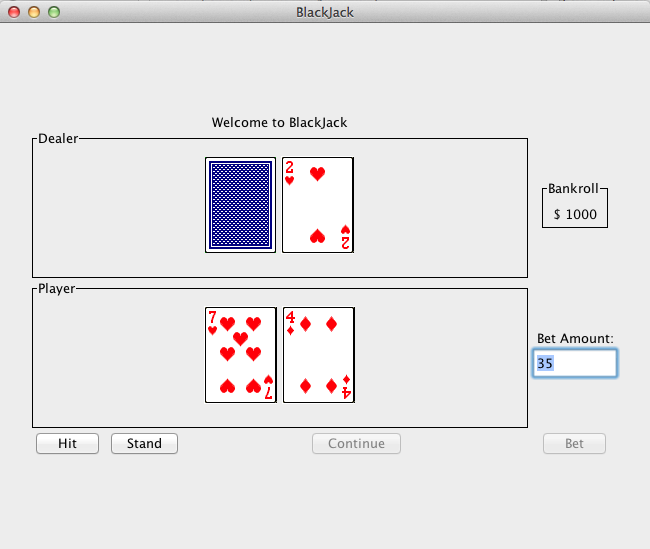
Output at Startup

The start up screen now looks like this:

BlackJackFixedHandDim.png

Output after round played

After User finishes a round then the Continue Button is active:

BlackJackAtContinueActive.png

Conclusion

This is almost complete. It now plays a game of BlackJack but there are some small things missing. There are also some Graphics design issues that need to be addressed

  • BlackJack logic
    • Need to shuffle the cards.
    • Need to track how many cards have been used and reshuffle when the CardDeck is low
  • Graphics fixes
    • Need a better Layout Manager that fixes the objects displayed in a more fixed fashion
    • The message label should be at the top of the screen where it will be noticed more
    • The continue button should go along side the Hit and Stand Buttons
    • The bankroll display should be enhanced to be in a JPanel with a title border and the amount inside the JPanel as a JLabel
    • It would be nice to have the bankroll display and bet amount controls on the right hand side of the screen. Maybe when the Layout Manager is fixed this will be easy to do.

Author: Nasty Old Dog

Validate XHTML 1.0

Sunday, May 19, 2013

BlackJack Graphics: Adding Functional Buttons

Graphical BlackJack: Need Some Buttons

Graphical BlackJack: Need Some Buttons

Introduction

Programatic control of a Graphics Program is structurally different from how the control of a text based program occurs. Text based programs have what I term "in-line" control. Meaning the program prints a prompt and waits for a reply. It's has a linear structure, hence the term "in-line". Graphics programs have EventListeners. EventListeners are method call-backs that must be set up to respond to Mouse clicks or pressing the return key. This means that the program logic for BlackJack is going to be spread around to these event listeners. This type of structure is going to take a little design work to make sure the game plays smoothly and is able to update all of the fields that track Bankroll, Bets, Wins, and Losses.

Some new Swing Objects

Now that this BlackJack program is going graphic, User input will need to be dealt with. The major input of the text based BlackJack was for HIT or Stand, and entering the amount bet. Once that user input is taken care of the program was able to complete the game automatically by

JButton

The one thing that will be needed is a JButton object. Buttons are used to present choices to the User. Anyone that has used a word processing program knows that when they go to save a "Dialog" box appears where they can change the name of the file and then there are 2 Buttons at the bottom. One is the "Save" button and the other the "Cancel" button. This provides the user a choice to save the file or to cancel and continue to make changes.

In BlackJack the following JButtons will be needed

  • Hit Button
  • Stand Button
  • Accept Bet Button
  • There is no need of a quit button because the JFrame is enabled to quit when the user presses the red "X" button built into the frame

The JButton accepts a String in the constructor to display the name of the JButton

JTextField

There needs to be a text field to enter the Bet amount that gets accepted by the Accept Bet Button. JTextField is a swing object that allows the user to input text.

The Code Changes

Just adding the 3 JButtons and the JTextField would change the code in the BlackJack run method as follows:

   public void run() {
//SwingUtilities.invokeLater(new Runnable() {
//            public void run() {
        JFrame frame = new JFrame("BlackJack");
        Container contentPane = frame.getContentPane();


        // Set the layout manager for the JFrame using the contentPaine
        FlowLayout layout = new FlowLayout();
        contentPane.setLayout(layout);

        frame.setDefaultCloseOperation(JFrame.EXIT_ON_CLOSE);
        frame.setPreferredSize(new Dimension(300,500));

//        PlayingCard p1 = new PlayingCard(2,2);
//        contentPane.add(p1);
        JButton hitButton = new JButton("Hit");
        JButton standButton = new JButton("Stand");
        JButton betButton = new JButton("Bet");
        JTextField betField = new JTextField();
        JLabel betLabel = new JLabel("Bet Amount:");

        player = new Hand("Player");
        player.deal(this.card);
        player.deal(this.card);
        player.deal(this.card);
        dealer = new Hand("Dealer");
        dealer.deal(this.card);
        dealer.deal(this.card);
        dealer.deal(this.card);
        dealer.deal(this.card);

//        this.card.addPlayingCardsToFrame(contentPane);
        frame.add(dealer);
        frame.add(player);
        frame.add(hitButton);
        frame.add(standButton);
        frame.add(betLabel);
        frame.add(betField);
        frame.add(betButton);
        frame.pack();
        frame.setVisible(true);

Output

Issues

  • There seem to be some sizing issues where a Hand will not display all it's cards
  • The JTextField should be large enough to see what you type
  • In general the FlowLayout manager is not such a good fit now that there are buttons involved. Better control of the display area would be nice.
  • None of the buttons cause the program to respond to mouse clicks.

JButton Event Handler

Event Handler is a class that has methods defined to respond to various graphics user inputs. Mouse Clicks and Keyboard presses are the typical example. But if this were an animated game then a Joystick may be used and Event Handlers would be created to handle those kind of events as well.

There are any number of ways to handle events for the BlackJack game the most straight forward would be to turn the BlackJack class itself into an EventHandler and override the methods on the event handler in the BlackJack class. For JButton the event handler is called an Action Listener and it is an interface specification which means there is no default implementation. The BlackJack class will have to override the method call "actionPerformed" specified by the interface.

To allow this one method to handle multiple buttons each button sets a text string command by calling the method setActionCommand on the JButton. The actionPerformed method would then test the ActionEvent parameter passed in to see which command is being sent and then act accordingly.

The following method calls will be used

  • betButton.setActionCommand("bet");
  • hitButton.setActionCommand("hit");
  • standButton.setActionCommand("stand");
  • need setActionListener(this) called with each of the buttons.
  • The actionPerformed method will be outfitted to add a card when the Hit button is pressed
  • Let's move the JButton definitions to fields in the BlackJack class since JButtons can be disabled and that may be functionality that could come in handy.
  • The JTextField needs to be a field so the actionPerformed method can pull the data out of it when the Bet button is clicked

Here are the changes made so far in the BlackJack Class:

public class BlackJack implements ActionListener{

    CardDeck card;
    Hand player;
    Hand dealer;
    BlackJackStrategy strategy = new BlackJackStrategy();
    JFrame frame = new JFrame("BlackJack");
    JButton hitButton = new JButton("Hit");
    JButton standButton = new JButton("Stand");
    JButton betButton = new JButton("Bet");
    JTextField betField = new JTextField();

    public BlackJack()
    {
        this.card = new CardDeck(this.strategy);   
    }

    /**
     * Handles all the graphics user input
     * @param ae ActionEvent generated by JButtons in the frame
     */
    @Override
    public void actionPerformed(ActionEvent ae) {
        if ("hit".equals(ae.getActionCommand())) {
            // Hit button press add a card to the player hand then redisplay frame
            this.player.deal(this.card);
            this.player.repaint();
            frame.validate();
            frame.repaint();
        }
    }

    /**
     * run method that does all the work of this class
     */
    public void run() {
//SwingUtilities.invokeLater(new Runnable() {
//            public void run() {
        Container contentPane = frame.getContentPane();


        // Set the layout manager for the JFrame using the contentPaine
        FlowLayout layout = new FlowLayout();
        contentPane.setLayout(layout);

        frame.setDefaultCloseOperation(JFrame.EXIT_ON_CLOSE);
        frame.setPreferredSize(new Dimension(300,500));

//        PlayingCard p1 = new PlayingCard(2,2);
//        contentPane.add(p1);
        // Need a label for the JTextField
        JLabel betLabel = new JLabel("Bet Amount:");

        // set the different Action Command Strings
        betButton.setActionCommand("bet");
        hitButton.setActionCommand("hit");
        standButton.setActionCommand("stand");

        // set this BlackJack class as the handler for each of the buttons
        betButton.addActionListener(this);
        hitButton.addActionListener(this);
        standButton.addActionListener(this);

        // Set up some hands
        player = new Hand("Player");
        player.deal(this.card);
        player.deal(this.card);
        dealer = new Hand("Dealer");
        dealer.deal(this.card);
        dealer.deal(this.card);

        // Add all the objects into the fram so they can be displayed
        frame.add(dealer);
        frame.add(player);
        frame.add(hitButton);
        frame.add(standButton);
        frame.add(betLabel);
        frame.add(betField);
        frame.add(betButton);
        frame.pack();
        frame.setVisible(true);
//            }
//});

This doesn't work other than showing the buttons and displaying the 2 dealer cards and 2 player cards. The positions have been change since all the buttons have their effects done on the player hand. This also has the added benefit of mimicking a BlackJack table where the player hand is at the bottom of the table and the dealer hand at the top.

Make Hit Button Work

Some investigation of the Hand displaying problems has to do with the fact that the text code is being performed and that is changing what is in the Hand fields for the Player and Dealer (they are being set to new Hand). Intially this is not a problem because because the Frame has not been manipulated. But now that the Hit button is being executed it will cause a problem and cards will be missing.

It's also time to fix how the JFrame is supposed to be called in the Java Tutorials.

  • First comment out all the text based code
  • Implement the Runnable interface on the BlackJack Class. The run method is already implemented so just add an "@Override" statement before the method definition
  • Add SwingUtilities.invokeLater(game); in place of the game.run() call

The Runnable interface is used for threading and it seems that Java Swing is happier when a graphics program is invoked in Java threading style using the SwingUtilities class rather than invoking the "run" method directly.

The new BlackJack Class is as follows:

/*
 * BlackJack a simple implementation upgrade for graphical card display
 */
package blackjack;

import java.awt.Container;
import java.awt.Dimension;
import java.awt.FlowLayout;
import java.awt.event.ActionEvent;
import java.awt.event.ActionListener;
import java.io.IOException;
import java.net.MalformedURLException;
import java.util.Scanner;
import javax.swing.JButton;
import javax.swing.JFrame;
import javax.swing.JLabel;
import javax.swing.JTextField;
import javax.swing.SwingUtilities;

/**
 * This class controls the game logic of this simple implementation of 
 * Black Jack. A more profession version would allow for multiplayer games
 * via a game server so you could play your friends on the internet. 
 * Some improvements would be:
 * <p>
 *    Adding insurance (players could insure bets against a dealer having blackjack) <p>
 *    Increase the payout for a blackjack hand to 1.5 x the original bet <p>
 *    Double Down <p>
 *    Splitting pairs <p>
 * 
 * @author Nasty Old Dog
 */
public class BlackJack implements ActionListener, Runnable{

    CardDeck card;
    Hand player;
    Hand dealer;
    BlackJackStrategy strategy = new BlackJackStrategy();
    JFrame frame = new JFrame("BlackJack");
    JButton hitButton = new JButton("Hit");
    JButton standButton = new JButton("Stand");
    JButton betButton = new JButton("Bet");
    JTextField betField = new JTextField();

    public BlackJack()
    {
        this.card = new CardDeck(this.strategy);   
    }

    /**
     * Handles all the graphics user input
     * @param ae ActionEvent generated by JButtons in the frame
     */
    @Override
    public void actionPerformed(ActionEvent ae) {
        if ("hit".equals(ae.getActionCommand())) {
            // Hit button press add a card to the player hand then redisplay frame
            this.player.deal(this.card);

            // Once the card is added you need to revalidate the frame and repaint
            frame.validate();
            frame.repaint();
        }
    }

    /**
     * run method that does all the work of this class
     */
    @Override
    public void run() {
//SwingUtilities.invokeLater(new Runnable() {
//            public void run() {
        Container contentPane = frame.getContentPane();


        // Set the layout manager for the JFrame using the contentPaine
        FlowLayout layout = new FlowLayout();
        contentPane.setLayout(layout);

        frame.setDefaultCloseOperation(JFrame.EXIT_ON_CLOSE);
        frame.setPreferredSize(new Dimension(300,500));

//        PlayingCard p1 = new PlayingCard(2,2);
//        contentPane.add(p1);
        // Need a label for the JTextField
        JLabel betLabel = new JLabel("Bet Amount:");

        // set the different Action Command Strings
        betButton.setActionCommand("bet");
        hitButton.setActionCommand("hit");
        standButton.setActionCommand("stand");

        // set this BlackJack class as the handler for each of the buttons
        betButton.addActionListener(this);
        hitButton.addActionListener(this);
        standButton.addActionListener(this);

        // Set up some hands
        player = new Hand("Player");
        player.deal(this.card);
        player.deal(this.card);
        dealer = new Hand("Dealer");
        dealer.deal(this.card);
        dealer.deal(this.card);

        // Add all the objects into the fram so they can be displayed
        frame.add(dealer);
        frame.add(player);
        frame.add(hitButton);
        frame.add(standButton);
        frame.add(betLabel);
        frame.add(betField);
        frame.add(betButton);
        frame.pack();
        frame.setVisible(true);
/*
        this.card.display();
        this.card.shuffle();
        this.card.display();

        // Now I just need to create the hand objects
        this.player = new Hand("Player Hand");
        this.dealer = new Hand("Dealer Hand");

        this.player.deal(card);
        this.dealer.deal(card);
        this.player.deal(card);
        this.dealer.deal(card);

        this.player.display();
        this.dealer.display();
        System.out.println("Player score = " + player.scoreHand());
        System.out.println("Dealer score = " + dealer.scoreHand());

          .
          .
          .

// Commented code cut out for space savings don't throw it away yet
// this code is going to need to be integrated into the actionPerformed
// method to run the game logic

          .
          .
          .

            // Code to score the game and settle the bet will go here
            // For now assume we win every time
            System.out.println("Player score: " + scr + "   Dealer: " + dscr);
            if (scr > dscr) {
                System.out.println("You Win!!!");
                bankroll = bankroll + bet;
            } else if (dscr > 21) {
                System.out.println("You Win!! Dealer has BUSTED");
                bankroll += bet;
            } else if (scr == dscr) {
                System.out.println("PUSH");
            } else {
                System.out.println("LOSER!!!");
                bankroll -= bet;
            }
            // reset hands to play a new game
            this.player = new Hand("Player Hand");
            this.dealer = new Hand("Dealer Hand");


        }
         * 
         */
    }

    /**
     * @param args the command line arguments
     */
    public static void main(String[] args) {
        try {
            CardImageFactory.initCardImageFactory("http://www.jfitz.com/cards/classic-playing-cards.png");
            BlackJack game = new BlackJack();

            SwingUtilities.invokeLater(game);
        } catch (MalformedURLException ex) {
            System.out.println(ex.getMessage());
        } catch (IOException ex) {
            System.out.println(ex.getMessage());
        }        
    }

 }

Output Intitial Window

Output Hit Button Pressed Once

Output Hit Button Pressed Twice

Conclusion

This is coming along nicely now. Graphically each feature added so far makes the program look and feel like a decent card game simulation. There are still a few things that need to be done.

  • The JTextField need to be stretched so that User Input can be captured and seen
  • The stand button needs to implemented (It doesn't do much graphically but triggers the program to handle the dealer Hand)
  • The initial entry into the program needs to be fixed so the Bet can be entered and the button logic is in place
    • Hit button should be disabled until the hands are dealt and the Bet button pressed
    • Stand button same as for Hit (There are enable and disable methods in the JButton class)
  • The Layout manager needs to be investigated so the buttons are fixed but the hands can expand
  • There needs to be a display of the player's current bankroll

For the Novice programmer take note of how bits and pieces of this project are being put together. When ever a developer is investigating a new library of code they usually step through small portions of the library's functionality. Then pull it all together into their design. This investigation into the Java Swing classes is no different. Java Swing is a big library with a large amount of options. It's important to get things functional and then to investigate the details when the simple use of the library no longer fits the design goals.

References

  1. The Java Tutorials, "How to Use Buttons, Check Boxes, and Radio Buttons" http://docs.oracle.com/javase/tutorial/uiswing/components/button.html

Author: Nasty Old Dog

Validate XHTML 1.0

Tuesday, May 14, 2013

Adding Graphics to BlackJack - Part II

Graphical BlackJack Adding Features

Graphical BlackJack Adding Features

Introduction

These final series of articles on Graphical Blackjack are written in near real time. I am reremebering some Java Graphics programming. I am sharing the design choices and reporting on the mistakes I make along the way. Since the target audience is the Novice programmer it's important for the Novice to see how new ground is broken in the Software Development. Most books walk you down the path of perfect design and implementation for their coding examples. While good design and documentation is important it assumes perfect knowledge in how an API works. If you are just learning how an API functions you can still be productive. The Novice programmer should not be afraid to fly by the seat of their pants. I hope seeing how design decisions affect a program and how easy it is to rip up code and reimplement will give you the courage to experiment on your own.

In this Graphics investigation another programming skill being displayed is the adaptation of code for a new purpose. In a commercial Blackjack Game the PlayingCard object might have to be designed as a completely new kind of object just to get that professional Vegas game look. As you will learn (if the ultimate goal is getting functional rapidly) we can adapt existing Java objects to do our bidding and a functional Graphics program can be put together quickly.

Without much introduction in the text below I introduce a very high level concept of Design Patterns. The subject matter of Design Patterns has been blogged about be Developers for a long time. I provide a source reference but the subject is something the reader needs to investigate further.

Problems with JFrame

The first try at adding graphics to the blackjack program dealt with getting a window to open and getting a card picture to display. Now the rest of the PlayingCards in CardDeck need to be displayed. Rather than turning CardDeck into a Graphics object, just add a call to place all the PlayingCards it has in the PlayingCard array into the JFrame.

/**
 * test routine to see how all the cards are displayed from the CardDeck
 * CardDeck is not a Graphics object itself but a container for the 
 * Graphics object PlayingCard.
 * @param f JFrame to add cards to
 */
public void addPlayingCardsToFrame(JFrame f) {
    for (PlayingCard c : deck) {
        f.add(c);
    }
}

Add the following line to the "run" method in the BlackJack class

  • this.card.addPlayingCardsToFrame(frame);

So the graphics method calls (in BlackJack.run()) now look like this:

JFrame frame = new JFrame("BlackJack");
frame.setDefaultCloseOperation(JFrame.EXIT_ON_CLOSE);
frame.setPreferredSize(new Dimension(300,300));
PlayingCard p1 = new PlayingCard(2,2);
frame.getContentPane().add(p1);
this.card.addPlayingCardsToFrame(frame);
frame.pack();
frame.setVisible(true);

When the program is executed the following window get's displayed:

  • What happened to the 3 of diamonds displayed before?
  • Where are all the rest of the playing cards added to the frame?
  • Why did it jump to the King of diamonds and just display that?

52 Card Pile Up

It turns out that they all got displayed! but, in the exact same place. Leaving the last card to be displayed as the only one visible. This is not the functionality I was hoping for. I was looking for the cards to be equally spaced in the JFrame for all to see

The problem stems from the fact that JFrame (in its current default state) doesn't know how to place my current implementation of PlayingCard. It ends up calling PlayingCard's paint method (at some point) but that method always starts it's painting at 0,0.

The Java Swing API has "manager" objects that tell the JFrame how to place the objects that have been added to the frame. These are "Layout" managers and they properly space objects based on various algorithms developed for displaying objects in a window.

Content Pane

The JFrame, according to the tutorials at the Oracle Website has a ContentPane that is already using the default layout manager FlowLayout. What the FlowLayout manager does is space objects out appropriately from left to right using the space available to determine how many cards to place horizontally and then it continues to place them vertically as rows of the same size until it runs out of JFrame space. To see all the objects at once the user must resize the JFrame with the mouse allowing more horizontal and vertical room. When this happens the FlowLayout Manager is supposed to redisplay the objects in the space available. The objects "Flow" into the amount of space.

This is not happening to the PlayingCard class. While we could delve deeper into the Graphics2D library and try to make this low level graphics API work appropriately the question comes up, why bother? From glancing at the Tutorials at the Oracle site things like JLabel and JButton get placed on the screen properly with the FlowLayout manager. Taking the high road the card image just has to extend one of these types and it should get placed properly (if the tutorials are to be believed).

JLabel

The following Tutorial at

has just the functionality this project needs. By creating a JLabel object that displays an Icon, maybe we can trick the JFrame into displaying all the cards just by inheriting from the JLabel object.

JLabel is usually used to present text labels next to text boxes (JTextField class) used for user input. The combination of the two objects is the way to present a Graphical Form to be filled out by the user. The Developers behind the Swing API ingeniously decided that a picture is as good as text for a JLabel. After reading through the Tutorial I came up with this implementation to try:

  • Change the CardImageFactory to produce "ImageIcon" objects (after all I had originally taken this out).
  • Change the PlayingCard class to inherit (ie. extend) from the JLabel class and modify its constructor to store the image
  • Adjust the testing method in CardDeck to add all the cards to the Content Pane from the JFrame object
  • Make the call to the CardDeck method in the "run" method of the BlackJack class

CardImageFactory

After renaming the Factory method call in CardImageFactory the code looks very close to the original from example posted on stackoverflow.com.

public static ImageIcon makeCardIcon(int rank, int suit) {
         int x = (rank * width) / PlayingCard.RANK;
         int y = (suit * height) / PlayingCard.SUIT;
         int w = width / PlayingCard.RANK;
         int h = height / PlayingCard.SUIT;
         //return fullDeckImg.getSubimage(x, y, w, h);
         BufferedImage cardImg = fullDeckImg.getSubimage(x, y, w, h);
         return new ImageIcon(cardImg);
}

PlayingCard

Having PlayingCard "extend" JLabel the class inherits the "setIcon" method from JLabel. Using the ImageIcon created from the factory call makeCardIcon there is nothing more that needs to be done. Crazy right. All that work with Graphics2D before was unnecessary. Just place the ImageIcon into the appropriate field in the super class and FlowLayout manager will find it and display it within the JFrame. That's the beauty of Object Oriented. Small changes can have awesome effects.

/*
 * PlayingCard.java - Playing card class for BlackJack
 */
package blackjack;

import javax.swing.JLabel;

/**
 * Object model of a simple playing card. Class has been adapted to be displayed
 * in a JFrame 
 * 
 * @author Nasty Old Dog
 */
public class PlayingCard extends JLabel{
    public static final int RANK=13;
    public static final int SUIT=4;
    private int cardno;
    private int score = 0;


    private String faceVal = "A23456789TJQK";
    private String suit = "CSHD";

    public PlayingCard(int cardno, int score)
    {
        this.cardno = cardno;
        this.score = score;
        this.setIcon(CardImageFactory.makeCardIcon(cardno%RANK, cardno%SUIT));
    }

    /**
     * Get the card scoring value for blackjack face cards = 10 ace = 11 
     * all other cards equal their face value. Aces can equal 1 at times and 
     * is handled elsewhere
     * @return 
     */
    public int card_value()
    {
        return this.score;
    }

    /**
     * convert cardno into text string of face value and suit
     * @return 
     */
    public String getCardText() {
        int card_val = this.cardno % 13;
        int card_suit = this.cardno % 4;
        return this.faceVal.substring(card_val, card_val + 1)
                + this.suit.substring(card_suit, card_suit + 1);
    }

    /*
     * paint the image for the Playing card as Graphics2D image
     * @param _g 

    @Override
    public void paint(Graphics _g) {
        Graphics2D g = (Graphics2D) _g;
        g.drawImage(img,5*this.cardno%13,5*this.cardno%4,this);
    }
     * 
     */
}

The paint method is all commented out. All the work is now done with two lines in the above code

  • public class PlayingCard extends JLabel{
  • this.setIcon(CardImageFactory.makeCardIcon(cardno%RANK, cardno%SUIT));

CardDeck

CardDeck will not need to be turned into a graphics object. But it does act as a container for graphics objects (remember PlayingCards is now a JLabel). So to assist in testing this program a method has been added "addPlayingCardsToFrame". You would think the parameter for this class should be a JFrame. But there are other objects that provide "ContentPane"s so a more general parent class has been used "Container". Testing may be extended to include those Swing objects (other than JFrame) so why not use the more general case.

/**
 * test routine to see how all the cards are displayed from the CardDeck
 * CardDeck is not a Graphics object itself but a container for the 
 * Graphics object PlayingCard.
 * @param p ContentPane (for now from JFrame) to add cards to
 */
public void addPlayingCardsToFrame(Container  p) {
    for (PlayingCard c : deck) {
        p.add(c);
    }
}

Design Patterns

There is one more change to CardDeck that has nothing to do with Graphics but it has been something that's been bothering me about the design of the code ever since it was changed into Object Oriented code. The Blackjack score value was hard coded into multiple classes because I was too lazy to decide how to best represent the functionality and at what level it should be placed.

There is no one right answer but my thinking was that a PlayingCard is a playing card, meaning in real life it is plastic coated piece of paper with pictures on it. It has no real notion of where the value comes from. That value comes from the type of game that is being played. It would be nice to move the game specific details out of PlayingCard, CardDeck, and Hand. Right? because if you needed PlayingCards that knew how to play BlackJack they should be called BlackJackPlayingCards and not PlayingCards implying some general usability.

For the next leap in your development as a Software Engineer/Computer Scientist you should get, read, and try to understand the book "Design Patterns" by the "Gang of Four". Once Object Oriented programming became established it was found to be an expressive platform to capture Higher Level concepts. While the code examples in the original book are written in C++ many authors have followed the Gang of Four and implemented examples in almost every language imaginable. The book codifies many things programmers used to have to work for a couple of years in industry to learn.

Strategy Pattern

So the strategy pattern looks like it will work. Since I don't plan on implementing different strategies at the present moment I'm not going to create a Strategy Interface that the Strategy Class should implement. Instead just a singlen BlackJackStrategy class will be used without the full hierarchy shown in the book.

BlackJackStrategy Class

The BlackJackStrategy Class is the final resting ground of the cardscore array. It will have a method call to return the BlackJack score of a card encapsulating the use of the card score array. The other method "getScore" takes a hand parameter and implements the scoring algorithm that used to be in the Hand object. The Hand sort method stays with the Hand class and returns an ArrayList of PlayingCards that are used to score the hand. This effectively isolates game specific information to one class. If you were to design a whole suite of card games you would extend this pattern to encompass the game logic of the other games.

/*
 * BlackJackStrategy.java
 */
package blackjack;

import java.util.ArrayList;

/**
 * This is a Strategy Design Pattern roughly implemented as Cataloged in 
 * the book Design Patterns by the Gang of Four. Hands and CardDecks are 
 * rather neutral objects. The stuff that makes a game Blackjack should be
 * in a separate class that gets passed to the CardDeck and Hand objects when
 * their constructor is called. In essence making a BlackJack Hand or BlackJack
 * CardDeck. This will pull all the card value arrays and scoring to a central
 * class. The biggest difference is that this class should be abstracted 
 * so that classes like CardDeck and Hand don't need to specify a particular
 * Strategy. The idea is to keep them agnostic and let the upper levels of the
 * program decide what kind of strategy will be imposed. For now however the 
 * class is being used to separate out the card_score array and the scoring
 * algorithm for hands. The ultimate goal would be to create a card game
 * platform where you only have to modify the strategy to create a new type
 * of card game. 
 * 
 * @author Nasty Old Dog
 */
public class BlackJackStrategy {
    private int card_score[] = {11, 2, 3, 4, 5, 6, 7, 8, 9, 10, 10, 10, 10};
    public final static int RANK = 13;

    BlackJackStrategy() {
        super();
    }

    /**
     * Take an internal int cardno representation and return it's blackjack 
     * value
     * @param cardno an integer between 0 and 51 that represents a specific card
     * @return the blackjack scoring value of the card
     */
    public int getCardScore(int cardno) {
        return this.card_score[cardno%RANK];
    }

    /**
     * determine the score of a blackjack hand, sort the hand then figure out
     * which Aces should be 1 or 11.
     * @param h the Hand class passed in
     * @return returns the score of the hand
     */
    public int getScore(Hand h) {
        ArrayList<PlayingCard> sorted = h.sortHand();
        int score = 0;
        for (PlayingCard i : sorted) {
            // Need to test each card to see if it is an ACE
            // If an ACE and score is < 11 use 11 as ACE value otherwise use 1
            // I haven't done a proof but I believe that checking the score
            // less than 11 is sufficient to handle ACEs and you won't bust a
            // hand incorrectly
            if (i.card_value() == 11) {
                // Processing ACE
                if (score >= 11) {
                    // ACEs must all be 1
                    score += 1;
                }
                else {
                    score += 11;
                }
            }
            else {
                // Just add card_value it's not an ACE
                score += i.card_value();
            }
        }
        return score;
    }
}

Then the CardDeck Constructor needs a BlackJackStrategy parameter to set the score of the PlayingCards created.

public CardDeck(BlackJackStrategy strategy) {
    for (int i = 0; i < 52; i++) {
        deck[i] = new PlayingCard(i, strategy.getCardScore(i));
    }
}

The Hand Class needs a little rework to have the sort method return an ArrayList rather than use an internal field variable. The constructors need to be modified to create a Strategy field. By overloading the Constructors no changes to the Hand calls do not have to be changed in BlackJack

/*
 * Hand.java
 * 
 */
package blackjack;

import java.util.ArrayList;

/**
 * models a hand of cards as one would expect in any card game.
 *
 * @author Nasty Old Dog
 */
public class Hand {
    ArrayList<PlayingCard> cards = new ArrayList<PlayingCard>();
//    ArrayList<PlayingCard> sorted = new ArrayList<PlayingCard>();

    private String displayName = "change in constructor";
    private BlackJackStrategy strategy = null;    

    public Hand()
    {
        this.displayName = "Hand";
        this.strategy = new BlackJackStrategy();
    }

    public Hand(String displayName)
    {
        this.displayName = displayName;
        this.strategy = new BlackJackStrategy();
    }

    public Hand(String displayName, BlackJackStrategy strategy)
    {
        this.displayName = displayName;
        this.strategy = strategy;
    }

    public void deal(CardDeck deck)
    {
       this.cards.add(deck.deal());
    }

    public ArrayList<PlayingCard> sortHand() {
        // sort hand make Aces 11 for sorting purposes
        // Use the insertion sort code and modify it by using the card_value
        // method as the way to sort

        ArrayList<PlayingCard> sorted = (ArrayList<PlayingCard>) this.cards.clone();

        // The clone statement does a deep copy of the array list
        // Just to prove it I print out the sorted field individually
        // If you had to copy individually (like for the AP) the code would
        // follow the structure below
        System.out.print("Cloned: ");
        for (PlayingCard i : sorted)
            System.out.print(i.getCardText() + " ");
        System.out.print("Size: " + sorted.size());
        System.out.println();
        PlayingCard tmp;
        for (int i = 1; i < sorted.size(); i++) {
            for (int j = i;
                    j > 0
                    && sorted.get(j).card_value() < sorted.get(j-1).card_value();
                    j--) {
                // swap values

                tmp = sorted.get(j);
                sorted.set(j, sorted.get(j - 1));
                sorted.set(j - 1, tmp);
            }
        }
        return sorted;
    }

    public int scoreHand() {
        return this.strategy.getScore(this);
    }

    public void display() {
        System.out.println(this.displayName);
        for (PlayingCard i : cards) {
            System.out.print(i.getCardText() + " ");
        }
        System.out.println();
    }

}

Final Touches

Last but not least Java Swing API method calls need to be added to the BlackJack run method:

//SwingUtilities.invokeLater(new Runnable() {
//            public void run() {
        JFrame frame = new JFrame("BlackJack");
        Container contentPane = frame.getContentPane();


        // Set the layout manager for the JFrame using the contentPaine
        FlowLayout layout = new FlowLayout();
        contentPane.setLayout(layout);

        frame.setDefaultCloseOperation(JFrame.EXIT_ON_CLOSE);
        frame.setPreferredSize(new Dimension(300,300));

        PlayingCard p1 = new PlayingCard(2,2);
        contentPane.add(p1);
        this.card.addPlayingCardsToFrame(contentPane);
        frame.pack();
        frame.setVisible(true);
//            }
//});

The calls that are commented out are reminders that I am not using the Swing API in the standard way. If you think for a moment how are all the mouse clicks going to be handled and what if we had a multiplayer game? The Swing API is meant to run in a separate thread of control and most of the examples on the The Java Tutorial site use this way of starting up the Swing API calls. I may or may not need this ultimately but I thought I would include it as a reminder it may become necessary.

The Full Code (for all the classes)

Output

References

  1. The Java Tutorials "How to Use Icons" The Java Tutorials: How to Use Icons
  2. Gamma, Erich, Richard Helm, Ralph Johnson, and John Vlissides. "Design Patterns: Elements of Reusable Object-oriented Software". Reading, MA: Addison-Wesley, 1995. Print.

Author: Nasty Old Dog