Showing posts with label Swing API. Show all posts

Friday, May 31, 2013

Java Swing BlackJack: The Final Touches

Graphical BlackJack: Adding Game Logic

Graphical BlackJack: Adding Game Logic

Introduction

In the original text based version of this game there was a considerable amount of game logic. The game would proceed in the following fashion:

  1. Game Start Up
  2. Player Enters Bet
  3. Initial Hands for Player and Dealer are displayed
  4. Player decides to Hit or Stand (This is looping code the player can Hit until the hand Busts or the Player presses Stand or the Hand = 21)
  5. The Dealer hand his played using the rule dealer must hit 16 or under
  6. The Hands are scored the closest to 21 without going over wins. Ties mean the bet money is returned and player starts a new hand
  7. Go back to step 2.
  8. Player quits by pressing the Windows red "X" button

Most of the above logic can be cut and pasted into the actionPerformed method with little revision. There will some Button handling things to add.

  • When the game starts the Hit and Stand buttons are disabled and the Bet button is enabled
  • After the Bet is placed the Bet button is disabled and the Hit and Stand buttons are enabled
  • When the stand button is pressed or the hand is bust or at 21 and before the dealer logic is started the Hit and Stand buttons are disabled.
  • After the winner is determined and it's time for a new round the Bet button needs to be enabled again.

JTextField problems

There is the issue (it's been ignored for a while) that the JTextField where the user enters the Bet amount needs to be enlarged. Currently it is appearing so small that when the user clicks in it to type something nothing appears. A simple call to the JTextField's setPreferredSize method placed in the BlackJack run method before the JTextField gets added for diplay will fix this:

  • betField.setPreferredSize(new Dimension(75,25));

Ouput
Start Up

  • Bet button active
    • nothing to be done the default state for a created JButton is Enabled = true
  • hit and stand inactive
    • add hitButton.setEnabled(false) and same for standButton
    • This is placed in run method after the buttons are created
  • Enter JTextField value and press bet
    • deactivate bet button
    • activate hit and stand
    • if no value entered in JTextField or non-numeric entered clear JTextField and leave bet button active and essentially do nothing until the user enters something meaningful (a try-catch block is used to capture this)
    • These changes are added to the actionPerformed method (check if "bet" action command has come in)

Code Changes to BlackJack

public void actionPerformed(ActionEvent ae) {
    if ("hit".equals(ae.getActionCommand())) {
        // Hit button press add a card to the player hand then redisplay frame
        this.player.deal(this.card);

        // Once the card is added you need to revalidate the frame and repaint
        frame.validate();
        frame.repaint();
    }
    if ("bet".equals(ae.getActionCommand())) {
        String betStr = betField.getText();
        try {
            this.bet = Integer.parseInt(betStr);
        } 
        catch (Exception ex) {
            // set bet = 0 and reset the JTextField to empty the box of bad text
            // return (do nothing user entered invalid text)
            // At some point need to add a Message display to window to 
            // Inform the user of problems
            betField.setText("");
            bet = 0;
            return;
        }
        // Bet is an int so go ahead and deactivate Bet Button enable hit and stand
        betButton.setEnabled(false);
        hitButton.setEnabled(true);
        standButton.setEnabled(true);
        frame.validate();
        frame.repaint();
    }
}

/**
 * run method that does all the work of this class
 */
@Override
public void run() {
    Container contentPane = frame.getContentPane();


    // Set the layout manager for the JFrame using the contentPaine
    FlowLayout layout = new FlowLayout();
    contentPane.setLayout(layout);

    frame.setDefaultCloseOperation(JFrame.EXIT_ON_CLOSE);
    frame.setPreferredSize(new Dimension(300,500));

    // Need a label for the JTextField
    JLabel betLabel = new JLabel("Bet Amount:");

    // set the different Action Command Strings
    betButton.setActionCommand("bet");
    hitButton.setActionCommand("hit");
    standButton.setActionCommand("stand");

    // set this BlackJack class as the handler for each of the buttons
    betButton.addActionListener(this);
    hitButton.addActionListener(this);
    standButton.addActionListener(this);

    // Disable Hit and Stand buttons
    hitButton.setEnabled(false);
    standButton.setEnabled(false);

    // Set size of the bet JTextField 
    betField.setPreferredSize(new Dimension(75,25));

Output

Here is the start up screen notice the hit and stand buttons are greyed out. The user has also entered "abc" for the bet amount BlackJackStartInactiveButton.png

After pressing the Bet button on the bad bet text the JTextField is reset and the bet Button remains active with the other buttons inactive. BlackJackAfterBadBet.png

Entering a number in the bet field and pressing the Bet button, the Bet button becomes inactivated, and the hit and stand buttons are now active .img/BlackJackAfterGoodBet.png

There are still a couple of issues lingering with this user input. The bet field is an int type. It can take on negative numbers which would mean that the user would get paid if they lose the hand. This can be handled by taking the absolute value of the entry or resetting and forcing the user to reenter.

The player can also enter 0 as a valid bet. So the second way above for handling a bad bet is probably the easiest. Just test for input less than or equal to 0 and reset if it is.

One more problem that is not dealt with is the fact that a bet is not checked against the bankroll. Losing all your money means your done playing in Vegas it may be a good thing to do here. But this problem will be deferred until later.

The following code added after the exception handling block (ie. try-catch) should fix the problems

// Check if bet is less than or equal to 0 and reset if it is
if (bet <= 0) {
    betField.setText("");
    bet = 0;
    return;
}

Add in Game Logic

While weaving in the game logic it became apparent that there is a need to have a message display and a continue button. Otherwise when the hands are scored the program will cause the hands to disappear (or at least that is the functionality you want) and the Player won't know what the status of the hand is and feel the program is cheating.

There also needs to be a screen area set aside to display the bankroll. That is how the Player determines how well they are doing. The JLabel will suffice for displaying text. Two more will be added one for an informational display and one for the Bankroll. We may want to place the bankroll JLabel inside a JPanel so it can have a titled border.

What was changed?

  • Added fields into BlackJack class for the continue button and the extra labels
  • Set the dimensions of the player hand and the dealer hand. This helps in maintaining the window at a constant size when there are no cards in the hand yet
  • Added a handleDealer method to do the game logic for the dealer's hand and scoring for determining win or lose
  • Added a resetFrame method to start a new round with no cards in the hands
    • remove all the swing objects from frame with a call to the ContentPane.removeAll method
    • then add back all the elements just like what happens at start up
  • worked the logic into actionPerformed
    • when to activate continue button and deactivate the others
    • The buttons keep the state of the game by being activated or deactivated
  • Moved some of the elements around to prepare for using a better Layout Manager than FlowLayout in the future
  • Got rid of all the text output method calls. Everything happens on the screen

Code for BlackJack

/*
 * BlackJack a simple implementation upgrade for graphical card display
 */
package blackjack;

import java.awt.Container;
import java.awt.Dimension;
import java.awt.FlowLayout;
import java.awt.event.ActionEvent;
import java.awt.event.ActionListener;
import java.io.IOException;
import java.net.MalformedURLException;

import javax.swing.JButton;
import javax.swing.JFrame;
import javax.swing.JLabel;
import javax.swing.JTextField;
import javax.swing.SwingUtilities;

/**
 * This class controls the game logic of this simple implementation of 
 * Black Jack. A more profession version would allow for multiplayer games
 * via a game server so you could play your friends on the internet. 
 * Some improvements would be:
 * <p>
 *    Adding insurance (players could insure bets against a dealer having blackjack) <p>
 *    Increase the payout for a blackjack hand to 1.5 x the original bet <p>
 *    Double Down <p>
 *    Splitting pairs <p>
 * 
 * @author Nasty Old Dog
 */
public class BlackJack implements ActionListener, Runnable {

    int bankroll = 1000;
    int bet = 0;
    CardDeck card;
    Hand player;
    Hand dealer;
    BlackJackStrategy strategy = new BlackJackStrategy();
    JFrame frame = new JFrame("BlackJack");
    JButton hitButton = new JButton("Hit");
    JButton standButton = new JButton("Stand");
    JButton betButton = new JButton("Bet");
    JButton continueButton = new JButton("Continue");
    JLabel bankLabel = new JLabel("Bankroll: " + bankroll);
    JLabel infoLabel = new JLabel("Welcome to BlackJack");
    JTextField betField = new JTextField();
    // Need a label for the JTextField
    JLabel betLabel = new JLabel("Bet Amount:");

    public BlackJack() {
        this.card = new CardDeck(this.strategy);
    }

    /** 
     * handles the Dealer hand playing logic
     */
    public void handleDealer(int pscr) {
        int dscr = 0;
        String msg = "Player score: " + pscr + "   Dealer: " + dscr;
        if (pscr > 21) {
            msg = msg + ": BUST LOSER!!!";
            bankroll -= bet;
        } else {
            for (dscr = dealer.scoreHand();
                    dscr < 17;
                    dscr = dealer.scoreHand()) {
                this.dealer.deal(card);
            }

            // Code to score the game and settle the bet will go here
            if (pscr > dscr) {
                msg = msg + ": You Win!!!";
                bankroll = bankroll + bet;
            } else if (dscr > 21) {
                msg = msg + ": You Win!! Dealer has BUSTED";
                bankroll += bet;
            } else if (pscr == dscr) {
                msg = msg + ": PUSH";
            } else {
                msg = msg + ": LOSER!!!";
                bankroll -= bet;
            }
        }

        // Print message about who won. Then wait for continue button to be 
        // pressed so user can have time to look at cards and verify the 
        // situattion
        infoLabel.setText(msg);
        betButton.setEnabled(false);
        hitButton.setEnabled(false);
        standButton.setEnabled(false);
        continueButton.setEnabled(true);
        frame.validate();
        frame.repaint();
    }

    /**
     * Handles all the graphics user input
     * @param ae ActionEvent generated by JButtons in the frame
     */
    @Override
    public void actionPerformed(ActionEvent ae) {
        if ("hit".equals(ae.getActionCommand())) {
            // Hit button press add a card to the player hand then redisplay frame
            this.player.deal(this.card);

            // Once the card is added you need to revalidate the frame and repaint
            frame.validate();
            frame.repaint();
            int scr = this.player.scoreHand();
            if (scr > 21) {
                // Player has gone bust display a message and activate continue button
                bankroll -= bet;
                this.handleDealer(scr);
            }
            if (scr == 21) {
                // Player has 21 and will win if dealer has <21 or bust
                this.handleDealer(scr);

            }
            // Otherwise do nothing player decides whether to hit or stand
        }
        if ("stand".equals(ae.getActionCommand())) {
            // Player is done getting cards time to do the dealer stuff
            this.handleDealer(this.player.scoreHand());
            betButton.setEnabled(false);
            standButton.setEnabled(false);
            betButton.setEnabled(false);
            continueButton.setEnabled(true);

        }
        if ("bet".equals(ae.getActionCommand())) {
            String betStr = betField.getText();
            try {
                this.bet = Integer.parseInt(betStr);
            } catch (Exception ex) {
                // set bet = 0 and reset the JTextField to empty the box of bad text
                // return (do nothing user entered invalid text)
                // At some point need to add a Message display to window to 
                // Inform the user of problems
                betField.setText("");
                bet = 0;
                return;
            }

            // Check if bet is less than or equal to 0 and reset if it is
            if (bet <= 0) {
                betField.setText("");
                bet = 0;
                return;
            }

            // Bet is an int so go ahead and deactivate Bet Button enable hit and stand
            betButton.setEnabled(false);
            hitButton.setEnabled(true);
            standButton.setEnabled(true);
            player.deal(this.card);
            dealer.deal(this.card);
            player.deal(this.card);
            dealer.deal(this.card);
            frame.validate();
            frame.repaint();
        }
        if ("continue".equals(ae.getActionCommand())) {
            betButton.setEnabled(true);
            hitButton.setEnabled(false);
            standButton.setEnabled(false);
            continueButton.setEnabled(false);
            bankLabel.setText("Bankroll: " + bankroll);
            infoLabel.setText("Welcome to BlackJack, Place your bet!");
            betField.setText("");
            bet = 0;
            player = new Hand("Player");
            dealer = new Hand("Dealer");
            this.resetFrame();
        }
    }

    /**
     * This reset the entire frame and reloads all the displayable objects in 
     * the proper order
     */
    public void resetFrame() {
        frame.getContentPane().removeAll();
        player.setPreferredSize(new Dimension(500,150));
        dealer.setPreferredSize(new Dimension(500,150));

        frame.add(infoLabel);
        frame.add(dealer);
        frame.add(player);
        frame.add(hitButton);
        frame.add(standButton);
        frame.add(continueButton);
        frame.add(betLabel);
        frame.add(betField);
        frame.add(betButton);
        frame.add(bankLabel);
        frame.validate();
        frame.repaint();
    }

    /**
     * run method that does all the work of this class
     */
    @Override
    public void run() {
        Container contentPane = frame.getContentPane();


        // Set the layout manager for the JFrame using the contentPaine
        FlowLayout layout = new FlowLayout();
        contentPane.setLayout(layout);

        frame.setDefaultCloseOperation(JFrame.EXIT_ON_CLOSE);
        frame.setPreferredSize(new Dimension(550, 450));


        // set the different Action Command Strings
        betButton.setActionCommand("bet");
        hitButton.setActionCommand("hit");
        standButton.setActionCommand("stand");
        continueButton.setActionCommand("continue");

        // set this BlackJack class as the handler for each of the buttons
        betButton.addActionListener(this);
        hitButton.addActionListener(this);
        standButton.addActionListener(this);
        continueButton.addActionListener(this);

        // Disable Hit and Stand buttons
        hitButton.setEnabled(false);
        standButton.setEnabled(false);
        continueButton.setEnabled(false);

        // Set size of the bet JTextField 
        betField.setPreferredSize(new Dimension(75, 25));

        // Set up some hands
        player = new Hand("Player");
        dealer = new Hand("Dealer");

        // Set a preferred size for the Hand JPanel
        player.setPreferredSize(new Dimension(500,150));
        dealer.setPreferredSize(new Dimension(500,150));

        // Add all the objects into the fram so they can be displayed
        frame.add(dealer);
        frame.add(player);
        frame.add(hitButton);
        frame.add(standButton);
        frame.add(betLabel);
        frame.add(betField);
        frame.add(betButton);
        frame.add(bankLabel);
        frame.add(infoLabel);
        frame.add(continueButton);
        frame.pack();
        frame.setVisible(true);
    }

    /**
     * @param args the command line arguments
     */
    public static void main(String[] args) {
        try {
            CardImageFactory.initCardImageFactory("http://www.jfitz.com/cards/classic-playing-cards.png");
            BlackJack game = new BlackJack();

            SwingUtilities.invokeLater(game);
        } catch (MalformedURLException ex) {
            System.out.println(ex.getMessage());
        } catch (IOException ex) {
            System.out.println(ex.getMessage());
        }
    }
}

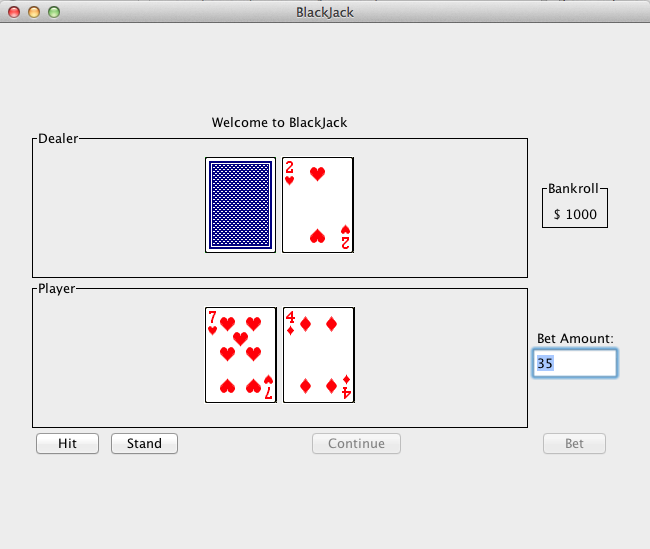
There were a bunch of changes and code has been woven in all over the place. The coding happened fast and furious, rather than upset the train of thought I plowed through it. Hopefully the reader can match up code to functionality on the screen.

Output at Startup

The start up screen now looks like this:

BlackJackFixedHandDim.png

Output after round played

After User finishes a round then the Continue Button is active:

BlackJackAtContinueActive.png

Conclusion

This is almost complete. It now plays a game of BlackJack but there are some small things missing. There are also some Graphics design issues that need to be addressed

  • BlackJack logic
    • Need to shuffle the cards.
    • Need to track how many cards have been used and reshuffle when the CardDeck is low
  • Graphics fixes
    • Need a better Layout Manager that fixes the objects displayed in a more fixed fashion
    • The message label should be at the top of the screen where it will be noticed more
    • The continue button should go along side the Hit and Stand Buttons
    • The bankroll display should be enhanced to be in a JPanel with a title border and the amount inside the JPanel as a JLabel
    • It would be nice to have the bankroll display and bet amount controls on the right hand side of the screen. Maybe when the Layout Manager is fixed this will be easy to do.

Author: Nasty Old Dog

Validate XHTML 1.0

Thursday, May 16, 2013

BlackJack: Extending Hand Class for Graphics

Graphical BlackJack Displaying Hands

Graphical BlackJack Displaying Hands

Introduction

In the first two articles on Graphics based BlackJack the concern was getting a card image to display, then to display all card images to make sure the underlying object system was robust enough to simulate an entire deck of cards graphically. After some playing around with Graphics2D and the Java Swing classes the design decision was made to use upper level Swing classes as the basis for the graphics design. Now it's time to extend that design to the Hand class. A Hand object is being used to collect cards for the player and the dealer. It should know how to display itself in the JFrame so the Hands can be seen by the user in the JFRame. There should also be some way of separating the hands graphically so they don't run into each other and look like one big hand.

JPanel

The JPanel object allows the developer to collect graphics objects to be displayed, grouping them in a separate graphics area inside the JFrame. By making the Hand object inherit from JPanel Player hands and Dealer hands can be separated on the screen.

Changes to the Hand Class

  • public class Hand extends JPanel{
  • Constructors have a Layout line added to them
    • this.setLayout(new FlowLayout());
  • The deal method adds the PlayingCard to the internal Hand ArrayList and to the JPanel list of displayed objects with the line:
    • this.add(c);

Hand Code

/*
 * Hand.java
 * 
 */
package blackjack;

import java.awt.FlowLayout;
import java.util.ArrayList;
import javax.swing.JPanel;

/**
 * models a hand of cards as one would expect in any card game.
 *
 * @author Nasty Old Dog
 */
public class Hand extends JPanel{
    ArrayList<PlayingCard> cards = new ArrayList<PlayingCard>();
//    ArrayList<PlayingCard> sorted = new ArrayList<PlayingCard>();

    private String displayName = "change in constructor";
    private BlackJackStrategy strategy = null;    

    public Hand()
    {
        this.displayName = "Hand";
        this.strategy = new BlackJackStrategy();
        this.setLayout(new FlowLayout());
    }

    public Hand(String displayName)
    {
        this.displayName = displayName;
        this.strategy = new BlackJackStrategy();
        this.setLayout(new FlowLayout());
    }

    public Hand(String displayName, BlackJackStrategy strategy)
    {
        this.displayName = displayName;
        this.strategy = strategy;
        this.setLayout(new FlowLayout());
    }

    public void deal(CardDeck deck)
    {
        PlayingCard c = deck.deal();
       this.cards.add(c);
       this.add(c);

    }

    public ArrayList<PlayingCard> sortHand() {
        // sort hand make Aces 11 for sorting purposes
        // Use the insertion sort code and modify it by using the card_value
        // method as the way to sort

        ArrayList<PlayingCard> sorted = (ArrayList<PlayingCard>) this.cards.clone();

        // The clone statement does a deep copy of the array list
        // Just to prove it I print out the sorted field individually
        // If you had to copy individually (like for the AP) the code would
        // follow the structure below
        System.out.print("Cloned: ");
        for (PlayingCard i : sorted)
            System.out.print(i.getCardText() + " ");
        System.out.print("Size: " + sorted.size());
        System.out.println();
        PlayingCard tmp;
        for (int i = 1; i < sorted.size(); i++) {
            for (int j = i;
                    j > 0
                    && sorted.get(j).card_value() < sorted.get(j-1).card_value();
                    j--) {
                // swap values

                tmp = sorted.get(j);
                sorted.set(j, sorted.get(j - 1));
                sorted.set(j - 1, tmp);
            }
        }
        return sorted;
    }

    public int scoreHand() {
        return this.strategy.getScore(this);
    }

    public void display() {
        System.out.println(this.displayName);
        for (PlayingCard i : cards) {
            System.out.print(i.getCardText() + " ");
        }
        System.out.println();
    }

}

Changes to BlackJack run Method

//        PlayingCard p1 = new PlayingCard(2,2);
//        contentPane.add(p1);
        player = new Hand("Player");
        player.deal(this.card);
        player.deal(this.card);
        player.deal(this.card);
        dealer = new Hand("Dealer");
        dealer.deal(this.card);
        dealer.deal(this.card);
        dealer.deal(this.card);
        dealer.deal(this.card);

//        this.card.addPlayingCardsToFrame(contentPane);
        frame.add(player);
        frame.add(dealer);
        frame.pack();
        frame.setVisible(true);

Output

So the player hand is on top and the dealer hand is on the bottom. I can tell for the following reasons:

  • The code only deals 3 cards to the player and 4 to the dealer
  • The cards have not yet been shuffled yet so while the suits will change the cards will be in numerical order
    • ace, 2 , 3 dealt to player
    • 4, 5, 6, 7 dealt to dealer
    • The suits should follow club, spade, heart, diamond (This change was made to match to the image file previously)
  • Something needs to be done to make it more obvious. Obviously a user should not have to understand the underlying code to know what their hand is.

Borders to the Rescue

According to the The Java Tutorials at the Oracle.com site. Every JComponent can have a border. JPanel inherits from JComponent so the following should place a black line border around the Hand cards:

  • this.setBorder(BorderFactory.createLineBorder(Color.black));
  • There is commented code in the Hand class to do the above

But the line while giving better separation doesn't provide much information as to which hand is which. Java Swing provides a TitledBorder object that can be used to draw a border and provide a piece of text that becomes a title of the area being sectioned off. The changes all take place in the Hand constructors"

    public Hand()
    {
        this.displayName = "Hand";
        this.strategy = new BlackJackStrategy();
        this.setLayout(new FlowLayout());
//        this.setBorder(BorderFactory.createLineBorder(Color.black));
//        this.setBorder(BorderFactory.createLoweredBevelBorder());
        Border blackline = BorderFactory.createLineBorder(Color.black);
        TitledBorder hTitle = BorderFactory.createTitledBorder(blackline, this.displayName);
        this.setBorder(hTitle);
    }

    public Hand(String displayName)
    {
        this.displayName = displayName;
        this.strategy = new BlackJackStrategy();
        this.setLayout(new FlowLayout());
//        this.setBorder(BorderFactory.createLineBorder(Color.black));
//        this.setBorder(BorderFactory.createLoweredBevelBorder());
        Border blackline = BorderFactory.createLineBorder(Color.black);
        TitledBorder hTitle = BorderFactory.createTitledBorder(blackline, this.displayName);
        this.setBorder(hTitle);
    }

    public Hand(String displayName, BlackJackStrategy strategy)
    {
        this.displayName = displayName;
        this.strategy = strategy;
        this.setLayout(new FlowLayout());
//        this.setBorder(BorderFactory.createLineBorder(Color.black));
//        this.setBorder(BorderFactory.createLoweredBevelBorder());
        Border blackline = BorderFactory.createLineBorder(Color.black);
        TitledBorder hTitle = BorderFactory.createTitledBorder(blackline, this.displayName);
        this.setBorder(hTitle);
    }

Output Hand as JPanel with Titled Border

Conclusion

Bit by Bit the graphics are starting to look a little like a real card game. There is one other issue with Hand that I foresee and it has to do the way BlackJack is played. In all the BlackJack discussions so far we have always displayed the dealer's hand completely. This was a testing device to make sure all operations were accounted for. At some point though the dealer's "hole" card will need to be dealt with. For now I'm good to let ride like it is now. It's still helpful from a testing standpoint to see all the cards.

The next thing to deal with is how to control the graphics based game. This is usually done with JButtons and JTextFields for user input. But these will be handled in Event method calls not in the run() method. There won't be a way to run the graphical and text based side by side. I have left the text based one in for testing purposes to make sure that this still plays BlackJack as before. But at some point as the graphics controls take over there won't be any need for the text based game.

References

Author: Nasty Old Dog

Validate XHTML 1.0

Sunday, May 12, 2013

Graphics Based Black Jack

AP Computer Science: After the Exam: Graphical BlackJack

AP Computer Science: After the Exam: Graphical BlackJack

The AP COMP SCI test is done

Congratulations to every one that took the 2013 AP Exam. This is probably the last series AP Computer Science Articles I write (at least until another one of my kids decides to take the course). Whatever score you end up getting I hope you pursue a few computer courses in college. Computers are involved in every aspect of business and manufacturing and understanding the concepts of building working programs will make you better managers and business owners. Too many managers in the 21st Century think that understanding how to use a spreadsheet is all they require to manage a 21st Century business. Instead I propose that great managers understand what it takes to get things accomplished and understand what goes into making a great product. My hope for the new generation of entrepreneurs is that you persue your talents with passion and take us forward in ways the spreadsheet jockeys can't even dream of, much less understand.

Now that you have some time and aren't worried about taking tests. I wanted to take the BlackJack Program to its next evolutionary step and add a Graphical User Interface to the BlackJack Program. I haven't used the Java Swing classes in a long time and have never considered myself a User Interface Programmer so I will step you through the process as an example of how at least one programmer treads into uncharted territory.

Spicing up BlackJack

First things first I'm going to steal some pictures and code. It seems legal because the developer has placed them on his(or her) website for free. So go to http://www.jfitz.com/cards/index.html and download the classic-cards.zip. That file contains a .png file of all the card faces needed to implement the game. The picture of all the cards in one file is there to. You are viewing it at the above site. By using your browser to do a "Copy Image Location" you can save the http address for use in the program.

Now go to the following message board site: stackoverflow.com There you will find a piece of code that uses the cards you downloaded. The code there shows you how to use them directly from the web without downloading prior to using them. Feel free to cut and paste the code into your IDE and see how it works. For this project I'm going to adapt one portion of that code: there is a "Factory" class called CreateCards. This grabs portions of the .png file to cut out single card images and store them in objects in a list.

class CreateCards {
   private static final int SUIT_COUNT = 4;
   private static final int RANK_COUNT = 13;

   public static List<ImageIcon> createCardIconList(String pathToDeck)
         throws MalformedURLException, IOException {
      BufferedImage fullDeckImg = ImageIO.read(new URL(pathToDeck));
      int width = fullDeckImg.getWidth();
      int height = fullDeckImg.getHeight();
      List<ImageIcon> iconList = new ArrayList<ImageIcon>();

      for (int suit = 0; suit < SUIT_COUNT; suit++) {
         for (int rank = 0; rank < RANK_COUNT; rank++) {
            int x = (rank * width) / RANK_COUNT;
            int y = (suit * height) / SUIT_COUNT;
            int w = width / RANK_COUNT;
            int h = height / SUIT_COUNT;
            BufferedImage cardImg = fullDeckImg.getSubimage(x, y, w, h);
            iconList.add(new ImageIcon(cardImg));
         }
      }
      Collections.shuffle(iconList);
      return iconList;
   }
}

Now the above code is not quite what we will use but it is informative. The author (pseudonym: Hovercraft Full of Eels) shows how to take the full deck image and divide it up into individual card images. The BlackJack program we created has a bit of a problem because we used modulo to create card face values and suits.

Instead of looping through the suits and "rank" (rank is what I originally termed face_value), use modulo to get the rank and suit. Change the text model order for the suits:

  • was: private String suit = "HDSC";
  • now: private String suit = "CSHD";

Now the card images get set up in a one to one correspondence image to text. Pretty simple change for some borrowed code.

This program doesn't really need the ImageIcon object. That provides some capabilities to move the image around on the screen. For a simple blackjack program there isn't really a need for this functionality. The code has been adapted further to use the BufferedImage class directly.

Hide the Image Down Deep Inside

To adapt the above code the question arises where do you store the image? The PlayingCard object is the obvious choice. A PlayingCard should know how to display itself.

The CardDeck object already loops 52 times to create all the PlayingCard's by calling the PlayingCard constructor method. By creating a BufferedImage field in the PlayingCard object and using the CardImageFactory method makeCardImage in the constructor, all the images will be associated with the PlayingCard Objects with very little coding. All that is needed is to properly map from our cardno in a PlayingCard to the appropriate image in the large image file.

First the new factory class CardImageFactory:

package blackjack;

import java.awt.image.BufferedImage;
import java.io.IOException;
import java.net.MalformedURLException;
import java.net.URL;
import java.util.ArrayList;
import java.util.Collections;
import java.util.List;
import javax.imageio.ImageIO;
import javax.swing.ImageIcon;

/**
 * Factory class to create images for each card so it may be displayed 
 * graphically. Everything is static but initCardImageFactory method 
 * must be called first to set up the full image of all the cards in memory
 * this way the call to makeCardIcon does not make 52 web accesses
 * 
 * @author Nasty Old Dog
 */
public class CardImageFactory {
   private static final int SUIT_COUNT = 4;
   private static final int RANK_COUNT = 13;
   private  static BufferedImage fullDeckImg = null;
   public static   int width = 0;
   public static   int height = 0;

      /**
    * Initialized the .png image in memory and sets up width and height 
    * readying size parameters to cut the image up into icons. This also
    * isolates IO exceptions to this method so the individual calls 
    * do not have to have exception handling.
    * 
    * @param pathToDeck the http address of the full card image file
    * @throws MalformedURLException
    * @throws IOException 
    */
   public static void initCardImageFactory(String pathToDeck) 
           throws MalformedURLException, IOException{
      fullDeckImg = ImageIO.read(new URL(pathToDeck));
      width = fullDeckImg.getWidth();
      height = fullDeckImg.getHeight();
   }

   /**
    * For the structure of the current Black Jack program this returns 
    * individual card images instead of a full list. This allows you to 
    * develop a class hierarchy where the image is stored at the individual
    * PlayingCard object level.
    * 
    * @param rank card face value number 0 - 12
    * @param suit suits 0 - 4
    * @return 
    */
   public static BufferedImage makeCardIcon(int rank, int suit) {
            int x = (rank * width) / PlayingCard.RANK;
            int y = (suit * height) / PlayingCard.SUIT;
            int w = width / PlayingCard.RANK;
            int h = height / PlayingCard.SUIT;
            return fullDeckImg.getSubimage(x, y, w, h);
            // BufferedImage cardImg = fullDeckImg.getSubimage(x, y, w, h);
           // return new ImageIcon(cardImg);
   } 

   /**
    * The original image list created from the example found at: 
    * http://stackoverflow.com/questions/9692465/java-how-do-i-drag-and-drop-a-control-to-a-new-location-instead-of-its-data
    * created by author who goes by pseudonym: "Hovercraft Full of Eels"
    * @return
    * @throws MalformedURLException
    * @throws IOException 
    */
   public static List<ImageIcon> createCardIconList()
         throws MalformedURLException, IOException {
      //BufferedImage fullDeckImg = ImageIO.read(new URL(pathToDeck));
      width = fullDeckImg.getWidth();
      height = fullDeckImg.getHeight();
      List<ImageIcon> iconList = new ArrayList<ImageIcon>();

      for (int suit = 0; suit < SUIT_COUNT; suit++) {
         for (int rank = 0; rank < RANK_COUNT; rank++) {
            int x = (rank * width) / RANK_COUNT;
            int y = (suit * height) / SUIT_COUNT;
            int w = width / RANK_COUNT;
            int h = height / SUIT_COUNT;
            BufferedImage cardImg = fullDeckImg.getSubimage(x, y, w, h);
            iconList.add(new ImageIcon(cardImg));
         }
      }
      Collections.shuffle(iconList);
      return iconList;
   }

}

I left the "Eels" original method in the class as a reminder of where all the code came from. I split the file access from the image chopping because the file access routines throw exceptions. I want to handle those right away. So they have been placed in the "initCardImageFactory" method. This method is called in the main method to set up images in memory to be cut up when calls to the PlayingCard constructor are made. There's no sense trying to even create PlayingCards or running the program further if the program can't access the image file. As a rule I don't like to have exceptions in constructors the code becomes ugly when trying to create an object.

The other problem with creating a CardImageFactory object is where will the object reside so that the PlayingCard object has access to it. It could be set up in CardDeck and then passed in to the PlayingCard constructor but this again makes the code ugly. It is better to make it a set of static fields and method calls and limit where they are called from.

Java Swing and Graphics2D Libraries

Now that the decision has been made about where the image creation will be done one more thing that is needed is some code that will open a window for all this great graphics to be displayed in. Once that is in place the code changes can be added to the PlayingCard object so that PlayingCard instances (the objects created by CardDeck) get displayed properly.

The Java Swing Library is a graphics API. It provides windows for the program to run in. It has a call to "add" graphic objects into the window. The blackjack program needs a window object and a class that the window object knows how to display.

  • JFrame class: from the Swing API provides a graphics window
  • JComponent class: Swing API class that can be displayed in a JFrame

Any object that has a graphical representation will need to extend JComponent. This gives the object the ability to be used within a JFrame. It also needs a paint method. JFrame will call the paint method on all the objects that have been added to it when 2 method calls take place:

  • frame.pack();
  • frame.setVisible(true);

Assuming the PlayingCard object has been modified the following code is all we need to display a card:

JFrame frame = new JFrame("BlackJack");
frame.setDefaultCloseOperation(JFrame.EXIT_ON_CLOSE);
PlayingCard p1 = new PlayingCard(2);
frame.getContentPane().add(p1);
frame.pack();
frame.setVisible(true);

The PlayingCard Class

The PlayingCard Object is where most of the action takes place. The constructors have the calls to makeCardIcon have been placed. The next changes that are necessary is the object must extend JComponent and have a "paint" method. The paint method takes a "Graphics" object as a parameter. This will ultimately be supplied by JFrame after we add the PlayingCard to the list of objects to be displayed.

There is some ugly casting of the "Graphics" object to the "Graphics2D" object. This harkens back to the early days of Java and the use of the AWT drawing classes. The Swing drawing classes are an improvement over the AWT classes because the Swing classes make calls directly to the windowing system of the computer. So windows computers will see MS Windows style windows and Mac users will see Mac style windows. To make this change happen without killing off the AWT API and all the programs that were created the idea of supplying a Graphics2D object came about. It implements everything that the AWT had so you can send it to an old AWT style program and it will think it the old "Graphics" object. But in newer code where you know your using a version of Java that supports Graphics2D you can cast the graphics object to Graphics2D and get all the extra functionality that the new class provides.

Without further ado the PlayingCard Class now looks like:

/*
 * PlayingCard.java - Playing card class for BlackJack
 */
package blackjack;

import java.awt.Graphics;
import java.awt.Graphics2D;
import java.awt.image.BufferedImage;
import javax.swing.JComponent;

/**
 * Object model of a simple playing card. Class has been adapted to be displayed
 * in a JFrame 
 * 
 * @author Nasty Old Dog
 */
public class PlayingCard extends JComponent{
    public static final int RANK=13;
    public static final int SUIT=4;
    private int cardno;
    private int card_score[] = {11, 2, 3, 4, 5, 6, 7, 8, 9, 10, 10, 10, 10};
    private BufferedImage img = null;

    private String faceVal = "A23456789TJQK";
    private String suit = "CSHD";

    public PlayingCard(int cardno)
    {
        this.cardno = cardno;
        this.img = CardImageFactory.makeCardIcon(cardno%RANK, cardno%SUIT);
    }

    public PlayingCard(int cardno, int[] card_score)
    {
        this.cardno = cardno;
        this.card_score = card_score;
        this.img = CardImageFactory.makeCardIcon(cardno%RANK, cardno%SUIT);
    }

    /**
     * Get the card scoring value for blackjack face cards = 10 ace = 11 
     * all other cards equal their face value. Aces can equal 1 at times and 
     * is handled elsewhere
     * @return 
     */
    public int card_value()
    {
        return card_score[cardno % 13];
    }

    /**
     * convert cardno into text string of face value and suit
     * @return 
     */
    public String getCardText() {
        int card_val = this.cardno % 13;
        int card_suit = this.cardno % 4;
        return this.faceVal.substring(card_val, card_val + 1)
                + this.suit.substring(card_suit, card_suit + 1);
    }

    /**
     * paint the image for the Playing card as Graphics2D image
     * @param _g 
     */
    @Override
    public void paint(Graphics _g) {
        Graphics2D g = (Graphics2D) _g;
        g.drawImage(img,10,10,null);
    }
}

Testing the program so far

The BlackJack class (the main class for this project) looks like this:

/*
 * BlackJack a simple implementation upgrade for graphical card display
 */
package blackjack;

import java.io.IOException;
import java.net.MalformedURLException;
import java.util.Scanner;
import javax.swing.JFrame;

/**
 * This class controls the game logic of this simple implementation of 
 * Black Jack. A more profession version would allow for multiplayer games
 * via a game server so you could play your friends on the internet. 
 * Some improvements would be:
 * <p>
 *    Adding insurance (players could insure bets against a dealer having blackjack) <p>
 *    Increase the payout for a blackjack hand to 1.5 x the original bet <p>
 *    Double Down <p>
 *    Splitting pairs <p>
 * 
 * @author Nasty Old Dog
 */
public class BlackJack {

    int card_score[] = {11, 2, 3, 4, 5, 6, 7, 8, 9, 10, 10, 10, 10};
    CardDeck card;
    Hand player;
    Hand dealer;

    public BlackJack()
    {
        this.card = new CardDeck();
    }

    /**
     * run method that does all the work of this class
     */
    public void run() {
// **************************************************************
//   Added graphics code
        JFrame frame = new JFrame("BlackJack");
        frame.setDefaultCloseOperation(JFrame.EXIT_ON_CLOSE);
        PlayingCard p1 = new PlayingCard(2);
        frame.getContentPane().add(p1);
        frame.pack();
        frame.setVisible(true);
// **************************************************************
        this.card.display();
        this.card.shuffle();
        this.card.display();

        // Now I just need to create the hand objects
        this.player = new Hand("Player Hand");
        this.dealer = new Hand("Dealer Hand");
/*
 *               .
 *               .
 *               .
 *      The rest of the code for run() remains unchanged from it's 
 *      previous incantation
 *               .
 *               .
 *               .
 */

    /**
     * @param args the command line arguments
     */
    public static void main(String[] args) {
        try {
            // initialize the CardImageFactory to use the full card image file
            CardImageFactory.initCardImageFactory("http://www.jfitz.com/cards/classic-playing-cards.png");
            BlackJack game = new BlackJack();

            game.run();
        } catch (MalformedURLException ex) {
            System.out.println(ex.getMessage());
        } catch (IOException ex) {
            System.out.println(ex.getMessage());
        }        
    }
}

The call to init the CardImageFactory has been placed in the main routine. The calls to the JFrame have been added and one PlayingCard object is created to see if we can create a window that displays a PlayingCard as a graphic instead of the text we have been doing before.

The Graphics

For this project I took the 4 BlackJack Classes created earlier (BlackJack, CardDeck, PlayingCards, and Hand) and added the CardImageFactory class and put them all into a new project. This helps to isolate the program so it can be packaged as a stand alone program. When you make the changes to BlackJack and PlayingCards you should see a window pop up.

It needs to be enlarged and the window is responsive to mouse commands. When it is enlarged we see a card was created and displayed using the PlayingCard.

Conclusion

The small window that opens up when the program is run is annoying. Nobody wants to have to reset the size with the mouse to see what is going on. The addition of one more method call on the JFrame object will fix the problem:

  • frame.setPreferredSize(new Dimension(300,300));

Adding this will open a window where the full card is displayed.

The other interesting behavior this program has is that the window is in control of terminating the program. If you kill the window the whole program terminates. For a graphics program this is the expected behavior. Right now the BlackJack program lives in a text based world that is separated from the graphics based world. It would be nice as the program transitions to span both worlds at the same time so a direct comparison between the graphics presentation and the text based presentation can be made. This may be beyond the scope of this project as JFrame objects are meant to run in a multi-threaded environment and weaving control back and forth may not be the best way forward.

For the entire source code download the following and unzip:

blackjacksrc.zip

NEXT STEPS

  • Modify CardDeck so it displays the entire deck of cards as a test to see that all images have been accounted for
  • Modify Hand so it displays it's cards graphically
  • Add graphic controls for the user to control the game
  • Weave in the blackjack control code into the graphics code to complete the game

References

  1. stackoverflow.com "Java: How do I drag and drop a control to a new location instead of its data?" answer by author pseudonym "Hovercraft Full of Eels" stackoverflow.com Link
  2. The Java Tutorials (oracle.com) "Using Swing Components: Using Top-Level Containers" Top-level Containers Link
  3. Hardy, Vincent J. "Java 2D API Graphics" Palo Alto, CA: Sun Microsystems, 2000.

Author: Nasty Old Dog

Validate XHTML 1.0